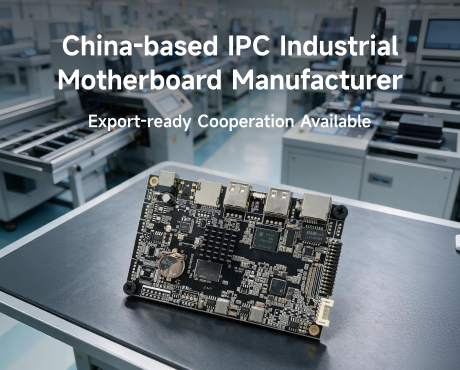
Product overview: What the A18 H618 board actually is
The A18 is an HDMI dongle class smart motherboard built on the Allwinner H618 platform: a 64-bit quad-core Cortex-A53 cluster paired with a G31 MP2 GPU and running Android 12. It belongs to the same deployment family as Android TV sticks, streaming dongles, OTT and IPTV set-top sticks, digital signage players, wireless casting units, hospitality television projects, portable projectors and in-vehicle screens - which is exactly why one carrier now gets re-spun into eight different product lines.
- Allwinner H618, 64-bit quad-core Cortex-A53. Enough headroom for a 4K player, a browser-based portal and a launcher shell. Not an application-class CPU, so heavy UI work has to be re-scoped or moved up a platform.
- G31 MP2 GPU with the full media pipeline. 4K at 60fps on VP9 Profile-2, H.265 Main10 at L5.1 and AVS2 JiZhun 10-bit, with H.264 topping out at 4K and 30fps. The encoder profile you hand your content team decides whether a 4K loop plays smoothly.
- 2GB LPDDR4 and 16GB eMMC as standard. Comfortable for a single-stream player with a local cache. Tight if the unit also runs a camera preview, a local database and a browser shell at the same time.
- TF card expansion to 64GB. 4GB, 8GB, 16GB, 32GB and 64GB cards are supported. The card is the offline content store for vehicles, classrooms and sites with no reliable link.
- WiFi 802.11 a/b/g/n/ac/ax on 2.4G and 5.8G. Dual-band with WiFi 6 on the same radio seat. The A18 specification lists WiFi only, so Bluetooth is a combo-module option on the custom build rather than a catalog default.
- HDMI output at 4K and 2K UHD. The feature block specifies HDMI 2.0a and the I/O line specifies HDMI 2.1; on a custom build we pin the exact transmitter and the exact cable qualification at design freeze rather than leaving it to the housing vendor.
- DC 5V at 1.5A with LED state, RTC, auto power-on and OTA. Blue LED for working, red for standby. That 1.5A figure is the single most violated number in the field, and it is where most of the incidents below start.
Specifications: What the AS-H618-MPF-CUS custom H618 board ships with
The AS-H618-MPF-CUS is a re-spin of the standard A18 carrier: the H618 platform, a compact multi-layer PCB laid out for the customer housing, industrial-grade components throughout, with conformal coating optional. The specifications below are the A18 default; every line is re-specable on request.
| Block | Specification |
|---|---|
| SoC | Allwinner H618, 64-bit quad-core ARM Cortex-A53 |
| GPU | G31 MP2, hardware compositing and the full media decode pipeline |
| Memory | 2GB LPDDR4 standard |
| Storage | On-board eMMC 16GB standard; TF card socket supporting 4GB, 8GB, 16GB, 32GB and 64GB cards |
| Operating system | Android 12; AOSP or GMS build; kiosk mode with a locked launcher and auto-start app |
| Display output | HDMI at 4K*2K UHD; HDMI 2.0a in the feature block and HDMI 2.1 on the I/O line, pinned at design freeze on a custom build |
| USB | Two USB lanes: one USB host port and one USB OTG port |
| Infrared | IR receiver and remote receiver connection |
| Wireless | WiFi 802.11 a/b/g/n/ac/ax on 2.4G and 5.8G; Bluetooth 5.0 or 5.4 as a combo option on custom builds |
| Wired network | Not on the A18 base; USB-to-Ethernet at 10/100M or Gigabit available on the custom carrier |
| Power | DC 5V at 1.5A; LED indicator, blue when working and red on standby |
| Clock and scheduling | RTC real-time clock; auto power-on; scheduled power on and off on custom builds |
| Upgrade paths | OTA upgrade support; USB and TF card upgrade; A and B slot with rollback on custom builds |
| Casting | DLNA and Miracast support on the base image; AirPlay and Google Cast receive paths on request |
| Input devices | 2.4G wireless mouse and keyboard support; IR remote; app-based control from phone or tablet |
| Language | English, French, German, Spanish, Italian and other multilateral languages |
| Applications | Online browsing of video websites, support for Netflix, Hulu, Flixster and YouTube; applications from Android market and Amazon App Store; local media playback from HDD, U disk and TF card; email and office suite |
| Software services | SDK development kit, BSP porting, driver adaptation, API development, system UI trimming, boot animation and pre-installed applications |
Decode and format matrix: What the H618 media pipeline actually plays
The single most expensive misunderstanding on this platform is the frame rate per codec. The part decodes VP9 Profile-2, H.265 Main10 at L5.1 and AVS2 JiZhun 10-bit at 4K and 60fps, and it decodes H.264 at 4K and 30fps. Everything else in the list below tops out at 1080P and 60fps. Hand your content team this table before they author a single file.
| Format | Profile and level | Maximum decode |
|---|---|---|
| VP9 | Profile-2 | 4K at 60fps |
| H.265 / HEVC | Main10 at L5.1 | 4K at 60fps |
| AVS2 | JiZhun 10-bit | 4K at 60fps |
| H.264 | BP / MP / HP at L4.2 | 4K at 30fps |
| H.263 | BP | 1080P at 60fps |
| MPEG-4 | SP / ASP at L5 | 1080P at 60fps |
| MPEG-2 | MP / HL | 1080P at 60fps |
| MPEG-1 | MP / HL | 1080P at 60fps |
| Xvid | -- | 1080P at 60fps |
| Sorenson Spark | -- | 1080P at 60fps |
| VP8 | -- | 1080P at 60fps |
| AVS / AVS+ | JiZhun Profile | 1080P at 60fps |
| WMV9 / VC1 | SP / MP / AP | 1080P at 60fps |
| Audio | MP3, AAC, WMA, RM, FLAC, Ogg | Full rate |
| Image | HD JPEG, BMP, GIF, PNG, TIF | Full resolution |
Read as a procurement rule: if your content pipeline outputs H.264 at 4K, you have already given up half the frame rate the part can deliver. Re-encoding to H.265 or VP9 is a free performance upgrade, and it is the first thing we flag in the feasibility study.
Interface layout and I/O map: Four positions, and no spares
The A18 is deliberately minimal: one HDMI output, two USB lanes, one IR receiver and one TF card socket. That is what keeps the bill of materials and the thermal envelope sane, and it is also why the interface positions and the lane allocation have to be agreed before the housing is cut. The map below is the standard allocation; the AS-H618-MPF-CUS re-spin can move any of it.
| No. | Name | Definition | Note for the custom build |
|---|---|---|---|
| 1 | HDMI | HDMI output at 4K*2K UHD | Transmitter and cable qualification pinned at design freeze |
| 2 | USB | USB host port | Reserved for keyboard, mouse, Ethernet bridge or local disk |
| 3 | USB OTG | USB OTG port | Doubles as the power input on most housings |
| 4 | IR | IR receiver and remote receiver connection | Profile tuned for the enclosure window material |
| 5 | TF card | TF card socket, 4GB to 64GB | Offline content store with the filesystem sized deliberately |
| 6 | Power | DC 5V at 1.5A input | Blue LED when working, red LED on standby |
| 7 | RTC | Real-time clock with auto power-on | Coin cell fitted and the schedule written before shipment |
| 8 | UBOOT | System software burn key | Recovery path for the A and B slot update scheme |
Two positions on this map cause more field returns than the rest of the board combined: the power input and the lane that carries it. If USB OTG is the power path, the USB host lane is the only peripheral lane left, and that decision has to be made at schematic time rather than at integration time.
Power and electrical performance: DC 5V at 1.5A is the whole budget
The A18 runs on a single 5V supply rated at 1.5A. Unlike a board with a wide-input tree, there is no second rail to fall back on, so the supply is the system. The figures below are the specification limits, plus indicative bench measurements taken on the A18 reference build at 25C for budget planning.
| Item | Specification or measurement | Note |
|---|---|---|
| Supply voltage | DC 5V | Specification limit |
| Rated supply current | 1.5A | Specification limit |
| Working indicator | Blue LED | Specification |
| Standby indicator | Red LED | Specification |
| Idle, launcher resident, no playback | About 0.30A | Indicative bench measurement |
| 1080P at 60fps decode | About 0.58A | Indicative bench measurement |
| 4K at 60fps H.265 decode | About 0.94A | Indicative bench measurement |
| Peak with WiFi streaming and a USB peripheral | About 1.34A | Indicative bench measurement, near the rated limit |
| Television USB-A host port | Often 0.5A | Field observation, the most common brownout source |
| Long cable run sag | Commonly 4.3V to 4.6V | Field observation, causes a reset at scene changes |
Read as a system: the difference between the 1.34A peak and the 1.5A rating is 0.16A, and that margin is consumed by a single USB peripheral or by a cable run that is one metre longer than the one on the bench. The projector product manager in Madrid who budgets the adapter, the cable and the peripherals together never sees the random-reset failure mode.
Assembly and integration notes: Eight things that void a return
Every one of these is taken from the A18 constraints and from field returns we have handled, and every one of them belongs on the incoming QC sheet before the housing is closed.
- Power the unit from an adapter that actually delivers 1.5A. A television USB-A socket that delivers 0.5A will run the launcher and then reset the moment the decoder hits 4K. Ship a dedicated adapter in the box.
- Check the supply at the end of the cable, not at the adapter. A one-metre run commonly sags to between 4.3V and 4.6V, which is inside the reset window at scene changes. Measure under load.
- Decide the OTG and host lane allocation at schematic time. If USB OTG carries power, the host lane is the only peripheral lane left on the board.
- Qualify the HDMI cable for 4K at 60fps, not for 1080P. A cable that passes 1080P will drop a 4K link at the worst possible moment, and the symptom looks like a decoder fault.
- Fit the RTC coin cell and write the schedule before shipment. Without a clock source the scheduled power-on reverts to a manual press, and the property portal or the channel list never rejoins on time.
- Size the TF card filesystem deliberately. The socket reads 4GB to 64GB cards, but the image has to be built to index the whole card, and an offline content store grows faster than a content team expects.
- Match the IR window to the enclosure. A tinted window or a recessed receiver changes the profile, and the remote then reads only from certain angles.
- Never ship an OTA without a fallback slot. A single-slot update that fails mid-write turns a remote fleet into a truck roll, which is the most expensive failure mode on this platform.
Application matrix: 8 customization scenarios for the AS-H618-MPF-CUS
The H618 is one carrier platform across eight different commercial media deployments. The matrix below shows the most common OEM/ODM customization angles a projector product manager in Europe walks through in the first scoping call.
| Scenario | Catalog board limit | AS-H618-MPF-CUS customization |
|---|---|---|
| Android TV stick and streaming dongle | 9.4 s to first frame, no rollback slot | Local boot asset, A and B slot OTA |
| Digital signage and commercial player | No remote OTA, one merged proof log | Customer-keyed OTA, per-screen proof-of-play |
| Wireless casting and meeting room | 11 s negotiation, Miracast only | Cached pairing, Miracast plus DLNA and AirPlay |
| Hospitality television dongle | 9 s welcome screen, session persists | Local welcome asset, checkout teardown |
| IPTV and OTT operator stick | 4.2 s channel list, no kiosk lock | Cached channel index, operator launcher lock |
| Portable and pico projector | Desktop thermal policy, stick mechanicals | Sealed-block thermal profile, re-laid-out board |
| In-vehicle rear-seat entertainment | 8 s first frame, no ignition sense | Local content store, ignition-sense shutdown |
| Multi-scenario OEM/ODM family | Three carriers, two BSP trains | One carrier, one BSP train, one MOQ |
OEM/ODM workflow: 8 steps from kickoff to first article
Below is the actual OEM/ODM workflow a projector product manager in Madrid walks through when commissioning a custom Allwinner H618 Android motherboard from AndroidSBC. No step is a placeholder.
- Day 0-2 - Requirements intake. A 90-minute call captures the housing, the display and the cable, the peripheral list and lane allocation, the OS and launcher choice, the content codec profile, the language list and the volume profile. Output: a one-page requirements sheet.
- Day 3-6 - Feasibility study. AndroidSBC engineers validate the memory and eMMC tier, the HDMI transmitter and cable qualification, the lane allocation for USB host and OTG, the WiFi and Bluetooth radio plan, the supply budget including the adapter, the BSP availability and the certification gap. Output: a feasibility report with go / no-go on each customization.
- Day 7-10 - Schematic and PCB layout. The AS-H618-MPF-CUS carrier board is laid out to the customer housing with the agreed I/O map and connector positions. Output: schematic and PCB review package.
- Day 11-13 - BSP porting. Android 12 AOSP or GMS is ported to the customer's build with kiosk-mode locking, scheduled power on and off on the RTC, the customer's launcher, and a local content cache. Output: a BSP build for the customer's evaluation team.
- Day 14-17 - Sample fabrication. Five to ten engineering samples are fabricated at the Shenzhen source factory, with conformal coating and stencil rework as required. Output: samples shipped to the customer by air.
- Day 18-21 - Customer evaluation. The customer's evaluation team runs display bring-up, thermal, EMC, decode matrix, peripheral integration, supply sag and field-replication tests. Output: an evaluation report with sign-off or change requests.
- Day 22-23 - Design freeze and mass-production tooling. Any change requests are absorbed, the design is frozen, and mass-production tooling is opened at the source factory. Output: a frozen Gerber and a frozen BOM.
Thirty days from kickoff to first article. Ninety-nine days from kickoff to mass production. This is the OEM/ODM rhythm that the projector product manager in Europe learns to expect from a Shenzhen source factory that does this work for a living.
Frequently asked questions
What is the MOQ for a custom Allwinner H618 Android board?
Answer: 150 units for OEM (a re-spin of the existing A18 carrier), 500 units for ODM (a from-scratch PCB layout). Sample orders of five units are accepted with an engineering report.
How long does OEM/ODM customization take from kickoff to first article?
Answer: 30 days on the workflow described above, including schematic, PCB layout, BSP porting, sample fabrication and customer evaluation. Mass production starts around day 99.
Can the board really do 4K at 60fps?
Answer: Yes, on VP9 Profile-2, H.265 Main10 at L5.1 and AVS2 JiZhun 10-bit. On H.264 the part tops out at 4K and 30fps, so a 4K H.264 asset will not run at 60fps on this platform.
Is there an Ethernet option?
Answer: Not on the A18 base board, which lists WiFi only. On a custom carrier we add a USB-to-Ethernet bridge at 10/100M or Gigabit on the host lane, and we document what that does to the supply budget.
Does the board support Bluetooth?
Answer: The A18 specification lists WiFi 802.11 a/b/g/n/ac/ax on 2.4G and 5.8G. Bluetooth 5.0 or 5.4 is available as a WiFi and Bluetooth combo module option on a custom build, which is what voice remotes need.
What power supply should we ship in the box?
Answer: A DC 5V adapter rated at 1.5A at the end of the cable, not a television USB-A socket that delivers 0.5A. Measure at the load, because a long cable run commonly sags to between 4.3V and 4.6V.
How big a TF card can we use?
Answer: The socket supports 4GB, 8GB, 16GB, 32GB and 64GB cards. On a custom build we size the filesystem so the whole card is indexed, which matters when the card is the offline content store for vehicles or classrooms.
Do you support Miracast, DLNA and AirPlay?
Answer: DLNA and Miracast are on the base image. AirPlay and Google Cast receive paths are ported on request, and the session negotiation is cached so a repeat cast starts in under two seconds.
What certifications can you pre-scope for our market?
Answer: CE / FCC / RoHS standard. UL / UKCA / KC / PSE / SAA, CCC, GMS and EDLA are available on request, and EMC pre-scanning is done in-house before third-party testing.
Do you accept sample and small-batch orders?
Answer: Yes. Samples ship in 1-3 days from stock where available; custom samples ship inside the 14-17 day window. Small-batch and large-volume pricing is available on request, FOB Shenzhen, CIF or an EXW price.